- Published on
Uncovering Account Takeover (ATO) Vulnerabilities via Desktop Reverse Engineering
- Authors

- Name
- Eric Ardiansa
- @eric_ardiansa
Uncovering Account Takeover (ATO) Vulnerabilities: A Deep Dive into Desktop Reverse Engineering
Reverse engineering an application is the process of analyzing a compiled binary to extract its source code, understand its internal workings, and identify hidden vulnerabilities. While much of the cybersecurity spotlight focuses on web and mobile application security, thick clients—or desktop applications—often harbor critical flaws that can lead to catastrophic breaches.
As a Penetration Tester, reverse engineering desktop applications is an essential skill. In this post, I will share my experience diving into a desktop penetration test, the layers involved, and how a seemingly simple decompilation effort led to a massive Account Takeover (ATO) vulnerability affecting all customers.
The Layers of a Desktop Pentest
Testing a desktop application is quite different from testing a web app. It requires a multi-layered approach to fully map out the attack surface:
- Network Layer: Analyzing the traffic between the application and the server. Tools like Burp Suite or Wireshark are used here. Unlike web browsers, thick clients might use custom protocols, binary serialization formats, or non-standard encryption over standard ports.
- File System Layer: Inspecting how the application interacts with the local operating system. Are there sensitive files written to disk? Are configuration files stored in plain text or weakly encrypted?
- Memory Layer: Dumping and analyzing the application's RAM usage to find plaintext passwords, encryption keys, or sensitive API tokens that are otherwise encrypted at rest or on the wire.
- Binary / Decompilation Layer: The core of reverse engineering. This involves using decompilers (like dnSpy, dotPeek, or ILSpy for .NET applications) to read the source code, trace logic, and find hardcoded secrets.
Tip based on my experience: Always start by identifying the technology stack. If the desktop app is written in C# (.NET) or Java, decompiling it to near-original source code is relatively straightforward. C/C++ binaries, on the other hand, require more advanced assembly-level debuggers and disassemblers like x64dbg or IDA Pro/Ghidra.
The Engagement: Step-by-Step Analysis
In a recent engagement, I was analyzing a trading desktop application built on the .NET framework. My goal was to map the attack surface and find a way to compromise user data. Here is the exact thought process and the steps I took to unravel the application.
Step 1: Understanding the Application Flow & Decompiling
The first step in any desktop pentest is to understand what the application does. I ran the application, logged in using a test account, and clicked around to generate network traffic. Simultaneously, I loaded the main executable into dnSpy (a popular .NET debugger and assembly editor).
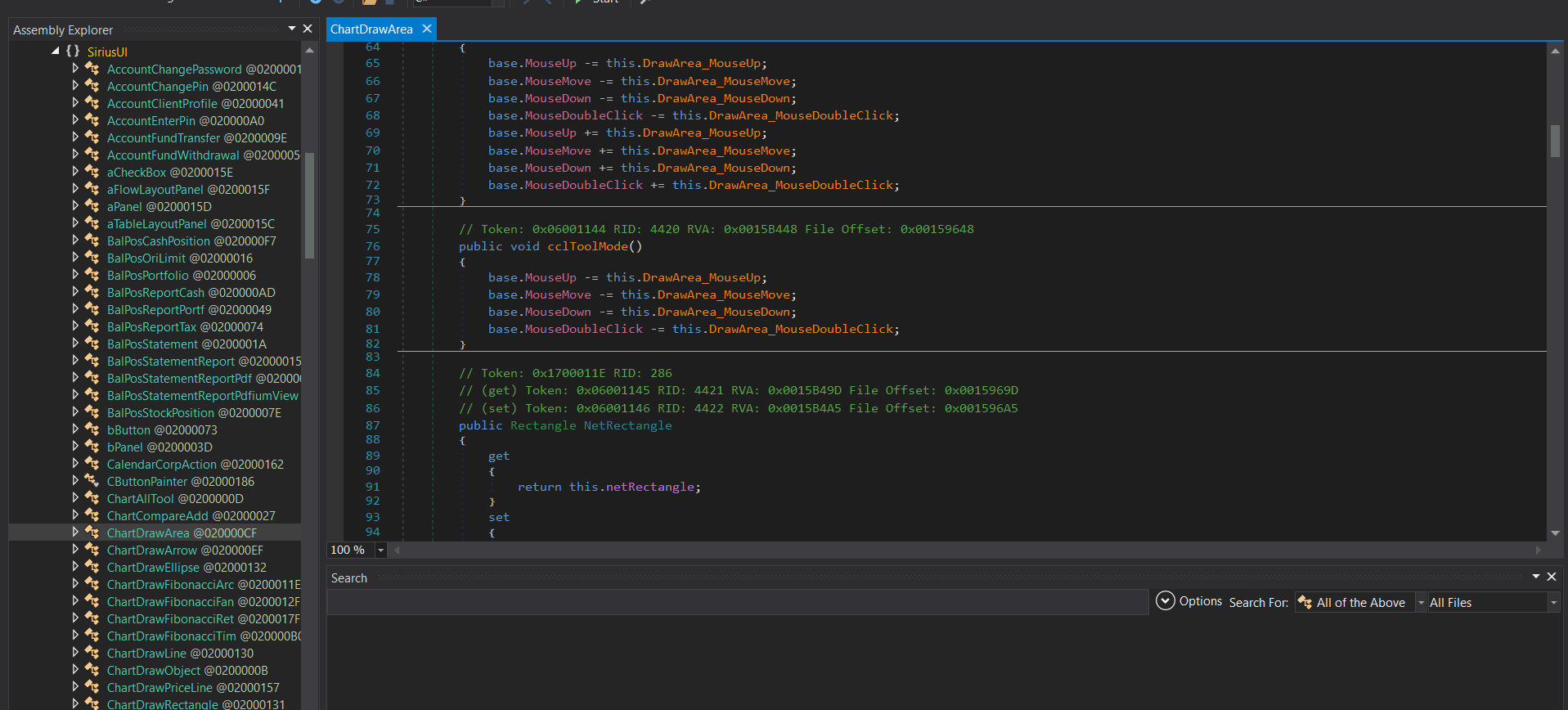
My usual workflow is to grep the source code for keywords like [crypt], key, password, token, and AES. During the code review phase, my attention was drawn to a specific class handling data decryption: [Converter.cs].
Step 2: Spotting Flawed Cryptography Architecture
By analyzing the decompiled code, I found out how the application handled encryption:
// Snippet from Converter.cs
public static string Encrypt(string plainStr)
{
    RijndaelManaged rijndaelManaged = new RijndaelManaged();
    rijndaelManaged.KeySize = GlobalVars.AesKeySize;
    rijndaelManaged.BlockSize = 128;
    rijndaelManaged.Mode = CipherMode.CBC;
    rijndaelManaged.Padding = PaddingMode.PKCS7;

    // The vulnerability lies here: Where do these GlobalVars come from?
    rijndaelManaged.IV = Converter.StringToByteArray(GlobalVars.Instance.AesHexIV);
    rijndaelManaged.Key = Converter.StringToByteArray(GlobalVars.Instance.AesHexKey);

    byte[] bytes = Encoding.UTF8.GetBytes(plainStr);
    ICryptoTransform cryptoTransform = rijndaelManaged.CreateEncryptor();
    byte[] array = cryptoTransform.TransformFinalBlock(bytes, 0, bytes.Length);
    return Convert.ToBase64String(array);
}
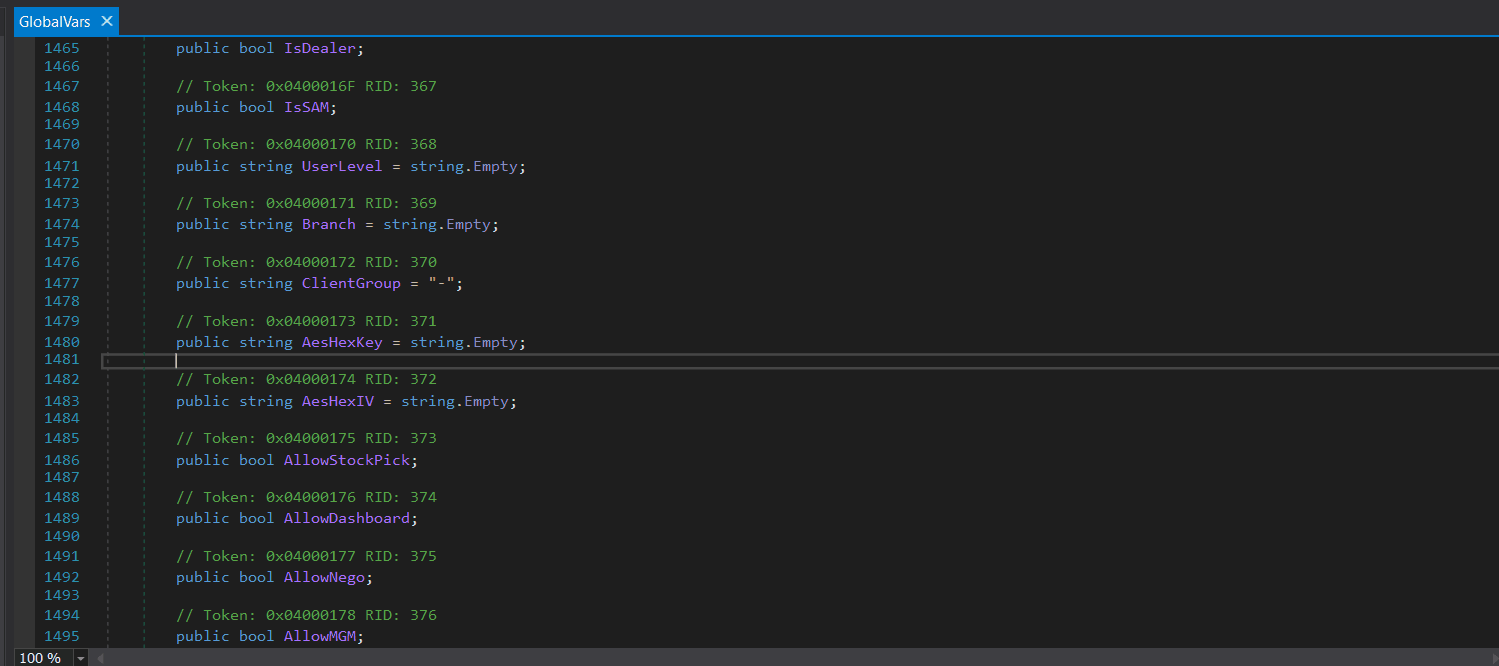
The application wasn't hardcoding the keys in the binary, which initially seemed like a good security practice. But I needed to figure out how GlobalVars.Instance.AesHexKey was populated.
Step 3: Correlating Code with Network Traffic
To trace the origin of the keys, I turned to my proxy tool, Burp Suite. I searched my HTTP history for the variable names and endpoints related to configuration.
I found a request to /account/getextdata. I looked at the server's response, and surprisingly, the server simply handed over the AES keys in plain text!
HTTP/2 200 OK
Content-Type: text/plain; charset=utf-8

<ext_data>
    <ext_k>****redacted**</ext_k>
    <ext_i>****redacted**</ext_i>
</ext_data>
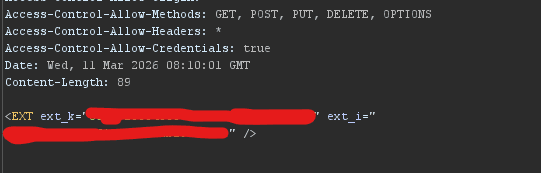
Impact: With the static AES keys (ext_k and ext_i) in hand, I could easily write a Python script to decrypt local user configurations and other protected strings that the application attempted to secure. This was a critical finding, but the rabbit hole went much deeper.
Step 4: The Decryption Bridge (Unlocking the Backend)
While monitoring the main login flow (POST /account/logons), I was analyzing the XML response returning from the server after a successful authentication. Alongside the standard token data, the application received an encrypted blob containing critical connection settings.
Using the AES keys I extracted in the previous step, I wrote a quick decryption script on the fly. Passing the server's encrypted response through my Python Rijndael (AES-CBC) decrypter revealed a beautifully formatted string hidden from the proxy traffic. Embedded deep within an <AUTH> XML tag, the decrypted payload revealed a peculiar flag called BroadcasterPass.
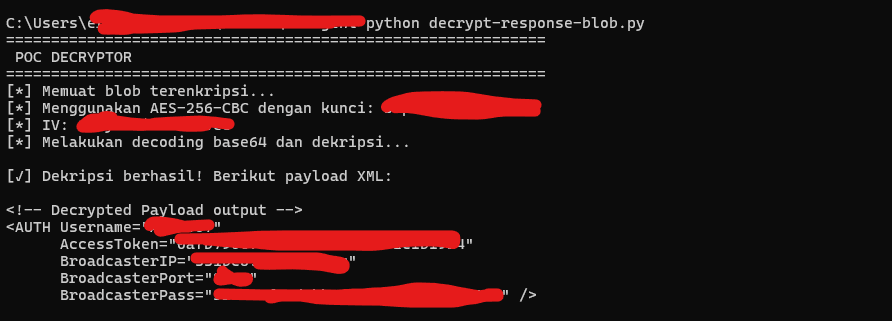
<!-- Decrypted Payload output -->
<AUTH Username="****redacted**
      AccessToken="****redacted**"
      BroadcasterIP="****redacted**"
      BroadcasterPort="****redacted**"
      BroadcasterPass="****redacted** />
Step 5: The Domino Effect (Total ATO via Redis)
By combining my static analysis (reading the decompiled [BooksleeveGate.cs] file) and the newly decrypted network traffic, I realized that the Broadcaster was actually a Redis instance.
This wasn't just a minor piece of metadata—it was the plaintext password to the organization's backend Redis messaging server, distributed to every single client to manage Pub/Sub operations for live market data!
Because the desktop application relied on Redis for its architecture, every client was inherently given the keys to the kingdom.
Step 6: The Final Exploit Chain (Account Takeover)
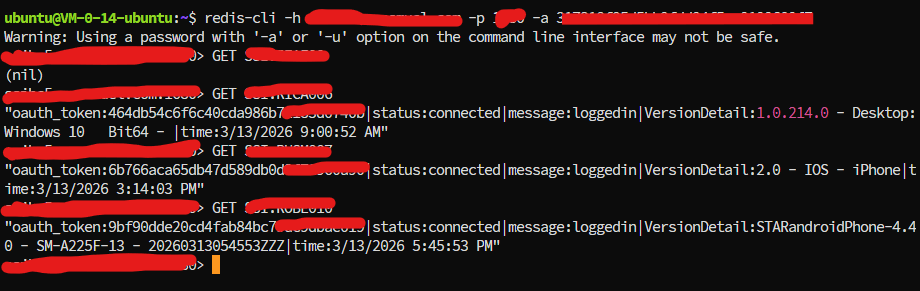
Knowing this, I connected directly to their publicly accessible Redis instance using a standard Redis CLI tool.
Once inside, I mapped the keyspace and realized that the Redis database wasn't just handling market feeds; it was also caching user sessions and OAuth tokens. By querying the database, I could extract the active oauth_token (Access Tokens) for any user currently logged into the platform.
Here is the full attack chain summarized:
- Reverse Engineer the App: Decompile the .NET binary using dnSpy to trace the cryptography logic and authentication flow.
- Intercept the Logon: Capture the
BroadcasterPassfrom the server's XML response using Burp Suite proxy. - Connect to Redis: Authenticate into the backend Redis server using the compromised password.
- Extract Session Tokens: Dump the active session keys and extract the
oauth_tokenvalues for high-value targets (Whales/Administrators). - Account Takeover: Inject the stolen token into my own API requests, gaining full control over victim accounts without ever knowing their usernames or passwords.
Conclusion
Desktop penetration testing requires a seamless blend of dynamic traffic analysis and static code review. Developers often assume that because an application is compiled, the secrets embedded within or the traffic it generates are safe from prying eyes. This engagement proves otherwise.
A weak architectural decision—sending a master Redis password to every single client, combined with transmitting static AES keys in plaintext—turned a standard API vulnerability into a mass Account Takeover. When auditing desktop apps, always look for what the server is whispering back to the client; sometimes, it's the keys to the entire database.